Archive
Dnsmasq fixing Comcast and VPNs
Twice in the last few weeks I’ve found uses of dnsmasq to solve DNS headaches: first to get around Comcast issues, and second to juggle both VPN and local hostnames.
Round 1 vs. Comcast: I discovered a while ago that I couldn’t get DNS resolution of a particular domain, elastic.org, nor its subdomains, though it would resolve just fine using a third-party DNS like Google’s 8.8.8.8. I couldn’t find any reason for this failure, the site’s admin had no idea, and of course Comcast support was no help. Surprise, rebooting my computer doesn’t help, when I just told you that every Windows and Linux computer I have fails even querying the server directly!
I hesitate to use Google DNS permanently, mainly for fear of losing CDN benefits, so for a while I just hard-coded the addresses in my hosts files. That’s not ideal in case they ever change, but the web is a fairly static place in practice. But then I discovered that dnsmasq has an option to route specific domains to specific DNS servers. My router is running DD-WRT with dnsmasq, so I just had to add “server=/elastic.org/8.8.8.8” to the config, and that one troublesome domain can now query through Google while the rest go through Comcast. That’s still a bit of a headache to maintain as I discovered other domains with a similar issue, but the problem was somewhat solved.
Round 2 vs. Comcast: Recently I also started having outright connection issues, which turned out to be dropping due to too-high transmit power negotiated in the modem. They replaced wiring to improve this, but in the process of troubleshooting they also “reactivated” my account. I noticed that the router was now getting different DNS servers from DHCP, so I tried elastic.org again and it worked! I manually queried both the old and new servers, and sure enough only the new was able to resolve that domain.
Turns out that the different servers came because the reactivation had also reset the Domain Helper feature, which I had previously opted-out of. The DNS that DHCP gives you depends on your choice in this setting. When the “helper” DNS is asked about an unknown name, it will give a bogus resolution to 208.68.143.50, which is a Comcast web server that informs you of the failure and does a web search instead. This is sort of OK for regular HTTP traffic, but it’s broken for many other uses. I’d rather have the proper NXDOMAIN, so the browser and any other clients can act accordingly. Dnsmasq comes to the rescue again with the option “bogus-nxdomain=208.68.143.50” in my config, and it will convert any name resolved to that address to a real NXDOMAIN instead. So faced with two broken Comcast DNS options, either unable to resolve good names or improperly resolving bad names, I’m able to eke out full and proper functionality again – yay!
[Update Aug 5, 2011] I just got another search page, argh! Turns out the IP I gave above is for search5.comcast.com, and this time I got search3.comcast.com, so this may be a bit of whack-a-mole. I scanned search[0-9] now, and got these three to set bogus-nxdomain: 207.223.0.140, 208.68.139.38, and 208.68.143.50.
Bonus round vs. VPN: I have several machines on my home network, and the router’s dnsmasq already does a fine job of resolving those local names. But my work computer uses openvpn to connect to the corporate network, and for that it needs the VPN’s DNS servers so it can resolve intranet names. I really want it to resolve names in both networks though. Then I discovered that NetworkManager has a configuration option “dns=dnsmasq“, which causes it to start a local dnsmasq with a “server=” option for the VPN’s domain. This means that only requests for the corporate domain will go through the VPN, and all others will use the local connection’s DNS, including the general internet and all my home machines. Perfect!
Force zoomed GNOME 3 workspaces
Almost a month ago now, I upgraded to Fedora 15, which brings with it GNOME 3. The UI changes are huge — oh, how the webs are screaming. One of the biggest issues is how very little is customizable. “How dare you question the brilliant designers!?! Surely they know what works best for you!” But it does have an extension system, so one can write in additional functionality. For adding features, this looks reasonable, but if you want to change features, get ready to monkey-patch into undocumented (and probably unstable) interfaces.
Well, there are plenty of longer rants out there, so I’ve said enough. When it actually comes down to it, I’m getting used to the changes, and it turns out that the shell doesn’t really matter so much. I don’t really feel like GNOME 3 is helping me be more productive, but it’s not hindering me either… faint praise.
I have identified a particular pain point though, so I decided I should share how I monkey-patched a solution. When you go into overview mode, there’s a partially hidden bar on the right side that displays your workspaces. Mouse over that, and it expands into view for you to choose your destination.
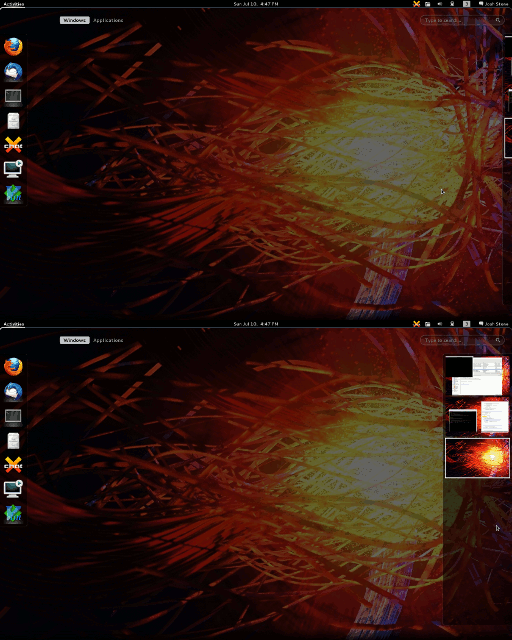
So far, so good — if that right side is hard edge for your mouse, then it’s easy to snap over there. However, if it’s not a hard edge, as with multiple monitors, then the hidden view is a difficult target. The gnome-shell developers did think of this, so they check the monitor positions:
js/ui/workspacesView.js :
    _updateAlwaysZoom: function()  {
        this._alwaysZoomOut = false;

        let monitors = global.get_monitors();
        let primary = global.get_primary_monitor();

        /* Look for any monitor to the right of the primary, if there is
         * one, we always keep zoom out, otherwise its hard to reach
         * the thumbnail area without passing into the next monitor. */
        for (let i = 0; i < monitors.length; i++) {
            if (monitors[i].x >= primary.x + primary.width) {
                this._alwaysZoomOut = true;
                break;
            }
        }
    },
My issue is that I have an additional monitor on the right edge that GNOME 3 knows nothing about, thanks to Synergy. So I want to just force that _alwaysZoomOut = true, since in this case I really do know better. Thankfully, javascript is flexible enough that I can just replace that whole function with my forced values. Thus an extension is born:
metadata.json :
{
    "shell-version": ["3.0.2"],
    "uuid": "zoomWorkspacesDisplay@cuviper.com",
    "name": "Zoom Workspaces Display",
    "description": "Forces the workspaces display to always be zoomed",
    "url": "https://blog.cuviper.com/",
    "original-authors": "Josh Stone"
}
extension.js :
const Overview = imports.ui.main.overview;
const WorkspacesView = imports.ui.workspacesView;

function main() {
    WorkspacesView.WorkspacesDisplay.prototype._updateAlwaysZoom = function() {
        this._alwaysZoomOut = true;
    };
    Overview._workspacesDisplay._alwaysZoomOut = true;
}
Put those in ~/.local/share/gnome-shell/extensions/zoomWorkspacesDisplay@cuviper.com/, and reload the shell (Alt-F2, r). Now the workspace chooser will always be fully displayed whenever you’re in the overview.
Update: Florian commented that he’s already improved the way this is handled for the next version of gnome-shell. For my own interest, I tracked it down to this bug and commit. Thanks!
 Josh Stone